Robot singer: build your own vocaloid
Type syllables, place notes on a piano roll, and a drawn singer sings your melody with a synthesized voice. Like the first vocaloids, only in your browser.
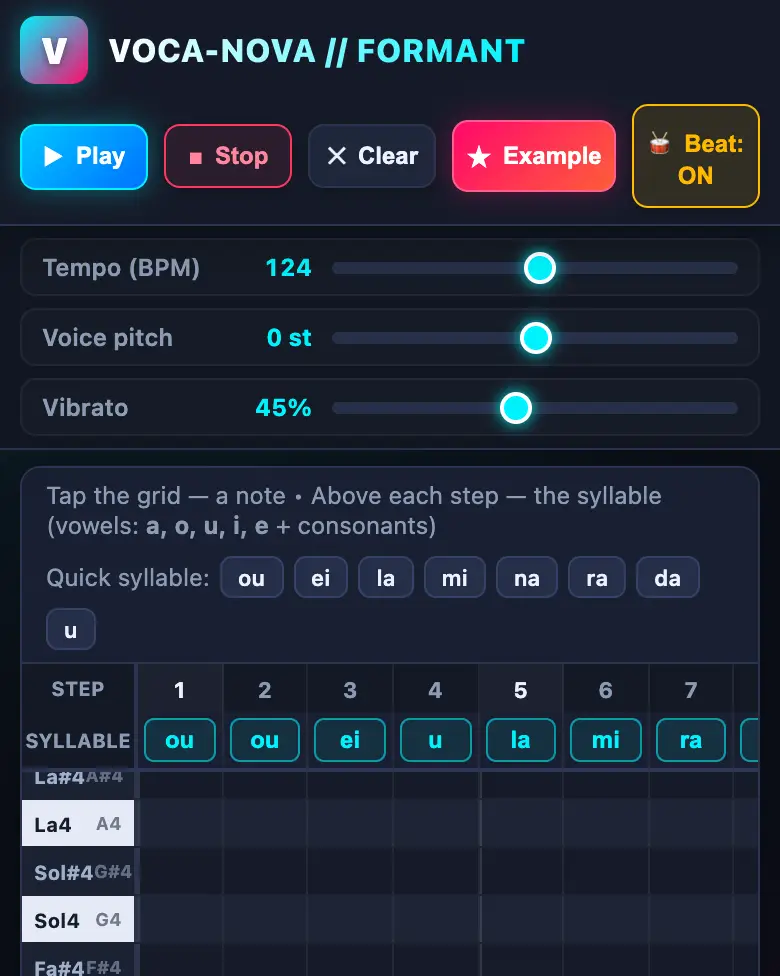
✓ Prompt tested in Gemini Pro: worked 3 out of 3 times
- Level
- Pro
- You make
- A singing synthesizer with a character in a single HTML file
- Age
- 12+
- Time
- ≈ 40 min
- Tools
- Gemini
- Account
- Paid plan (a parent’s)
What you’ll get
This mission is for a paid Gemini account (Google AI Pro): a stronger model writes sound-synthesis code more reliably. The voice will sound robotic — that’s how the first singing synthesizers sounded. We tested the prompt 3 times out of 3.
Steps
-
Open gemini.google.com on a parent’s account with Google AI Pro and pick the strongest model (ours was Argon).
-
Copy the whole prompt and send it:
Make a vocaloid-like singing synthesizer in a single HTML file. Don't load anything from the internet: no Tailwind, no CDN, no fonts, no images and no libraries — only your own CSS and JavaScript inside the file. Don't save anything in the browser's storage. Build the voice in Web Audio with formant synthesis: a sawtooth oscillator with a light vibrato goes through three band-pass filters set to the formant frequencies of the vowels a, o, u, i, e; consonants are a short burst of noise before the vowel. At the top, a piano roll of 2 octaves and 16 steps: a tap places a note, and every note has a field for a syllable (for example "la", "mi"). Buttons: Play, Stop, Clear, Example (your own powerful melody in the style of stadium pop-rock, like Imagine Dragons: rhythmic "oh-oh" and "hey", a strong chorus; don't copy other people's songs, compose your own). Sliders: tempo, voice pitch, vibrato. The sound starts only after Play is pressed. At the bottom, draw an anime singer on a canvas: her mouth opens in the shape of the current vowel, and the current note lights up. Check that all variables are declared. Everything must look good on a phone. Show the result in Canvas. -
Wait about a minute, click Preview, then Example and Play.
-
Check the AI (see the question above).
-
Compose your own song and click Download (sometimes it’s the Export menu) — the file opens in any browser.
Change the prompt
Change only the words, and keep the rules about the internet and Canvas.
- “anime singer” → “a robot singer with antennas”
- “like Imagine Dragons” → your favorite band or style: “like K-pop”, “like rap”
If it doesn’t work
- No sound? Write:
There's no sound after pressing Play. Find and fix the error in Web Audio. - The voice just hums? Write:
The vowels sound the same. Make the formants for a, o, u, i, e more different from each other. - No Preview button? Write:
Show the result in Canvas.
Sending work to the gallery opens soon.