Cannon: a projectile physics game
Angle, speed, air resistance and planets: hit the target and learn how projectiles fly. A physics game for class, one prompt in Gemini.
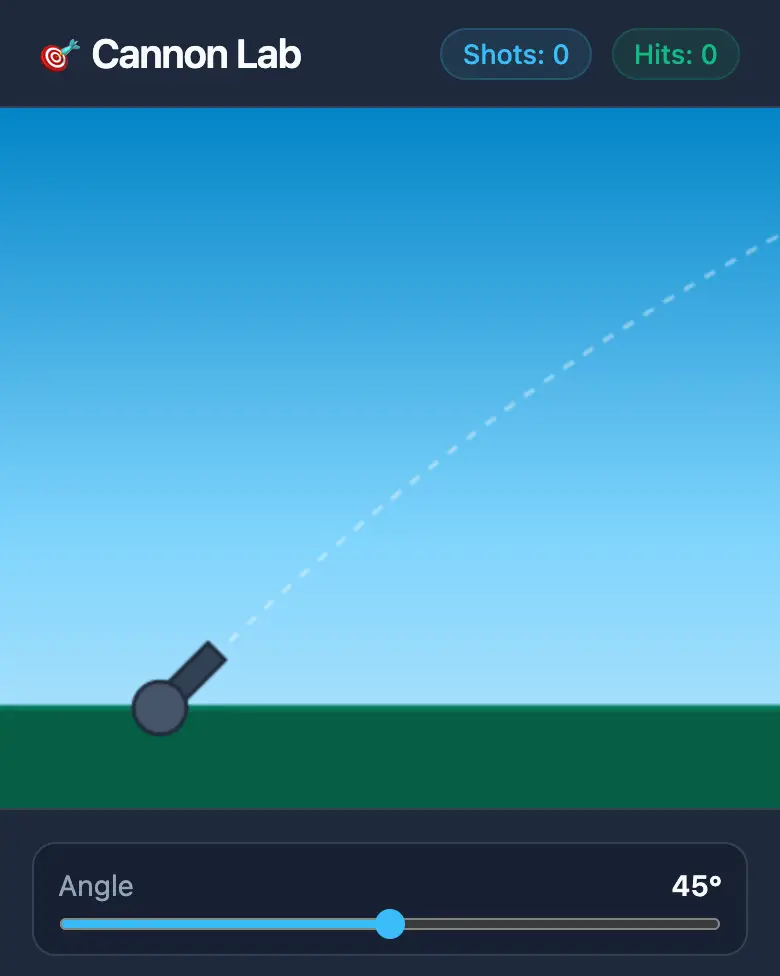
✓ Prompt tested in Gemini (signed out): worked 3 out of 3 times
- Level
- Intermediate
- You make
- A physics game-lab in one HTML file
- Age
- 11+
- Time
- ≈ 30 min
- Tools
- Gemini
- Account
- Not needed
What you’ll get
A cannon, a target, angle and speed sliders, and a dotted trajectory line. After each shot you see the height, distance and flight time. Hit the target and it moves. Press “Play the example” above — Gemini made it from the prompt below.
Steps
-
Open gemini.google.com. If you’re under 13, do it together with a parent, on their device.
-
Copy the whole prompt and send it:
Make a "Cannon" lab in one HTML file. Don't load anything from the internet: no Tailwind, CDN, fonts, images or libraries — only your own CSS and JavaScript inside the file. Don't save anything in browser storage. On a canvas, put a cannon on the left and a target at a random distance on the right. Add sliders for angle (0–90°) and speed, and a "Fire!" button. Show with a dotted line where the cannonball will go. The cannonball flies along a real parabola (Y axis pointing up), with an "air resistance" switch. After each shot, show the height, distance and flight time. Add a planet choice: Earth, Moon, Mars. Count how many shots it took to hit the target; after a hit, the target moves. Everything should look good on a phone. Show the result in Canvas. -
Wait about a minute, press Preview and try every button and slider.
-
Check the AI (see the question above).
-
Press Download (sometimes it’s under the Export menu). The file opens in any browser. Show it off in class!
Change the prompt
Before sending, swap a few words to make your own version. Change only the words, and keep the rules about the internet and Canvas.
- “Earth, Moon, Mars” → “Earth, Jupiter, Moon”
- “cannon” → “catapult”, “cannonball” → “watermelon”
If it doesn’t work
- The AI says it changed everything, but the result looks the same? Write:
Nothing changed. Show the updated version in Canvas. - No Preview button? Write:
Show the result in Canvas. - The cannonball flies down instead of up? Write: “The ball flies into the ground. The Y axis must point up. Fix it.”
Sending work to the gallery opens soon.