Catch the AI making a mistake: letter counting
Four simple questions where the AI trips up almost every time. Count yourself, catch the mistake and make a proof card in Gemini.
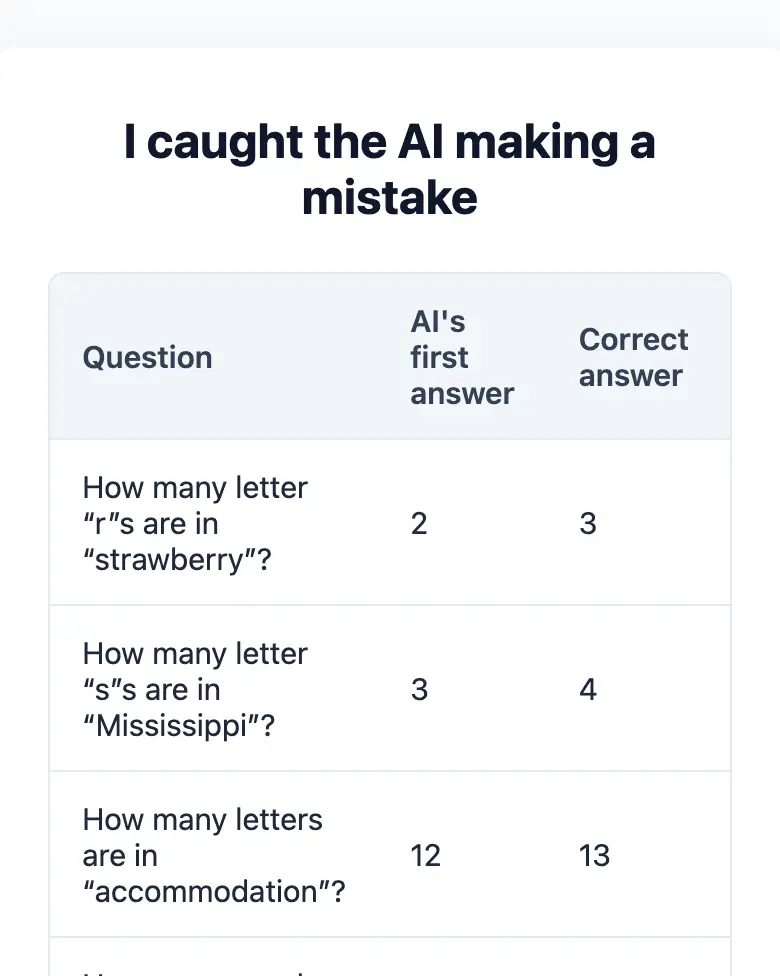
✓ Prompt tested in Gemini (signed out): worked 3 out of 3 times
- Level
- Beginner
- You make
- An “I caught the AI” proof card in a single HTML file
- Age
- 9+
- Time
- ≈ 20 min
- Tools
- Gemini
- Account
- Not needed
What you’ll get
You will ask the AI four questions that a second-grader can solve with a pencil. The AI will make mistakes: it often gets some of these wrong, and counting letters is a famous weak spot. Then you will make it check itself and build a proof card. Press “Play the example” above: it is a card Gemini made. Find the mistake in it.
Steps
-
Count yourself first, on paper, letter by letter:
- How many letter “r”s are in the word “strawberry”?
- How many letter “s”s are in the word “Mississippi”?
- How many letters are in the word “accommodation”?
- How many words are in the sentence “My cat sat on the mat, and my dog chased a ball in the garden”?
-
Open gemini.google.com. If you are under 13, do it together with a parent, on their device.
-
Send the questions to the AI:
Answer each question with a single number, no explanations: 1. How many letter "r"s are in the word "strawberry"? 2. How many letter "s"s are in the word "Mississippi"? 3. How many letters are in the word "accommodation"? 4. How many words are in the sentence "My cat sat on the mat, and my dog chased a ball in the garden"? -
Compare with your answers. Where did the AI get it wrong? Now make it check itself:
Check yourself: write out each word letter by letter with hyphens, number the letters and count again. Which answers were wrong? -
Make the card:
Make one HTML page called "I caught the AI making a mistake". Don't load anything from the internet: no Tailwind, no CDN and no fonts. A table: the question, the AI's first answer, the correct answer and a ✅ or ❌ icon. At the bottom, one sentence: why the AI makes mistakes when it counts letters. Show the result in Canvas. -
Check the AI again (the question above) and press Download (sometimes it is in the Export menu).
Change the prompt
Before sending, swap a few words and you get your own version. Change only the words, and keep the rules about the internet and Canvas.
- Swap in long words of your own: “electrification”, “unbelievable”, “extraordinary”. Count first, then ask the AI.
- “How many letter “r”s” → “How many letter “e”s”
Why this happens
The AI does not read text letter by letter but in chunks called “tokens”: “straw”, “berry”. That makes counting letters hard for it, while writing a word out letter by letter is much easier. This is one of the main secrets of working with AI: ask it to show its steps.
If it doesn’t work
- No Preview button on the card? Write:
Show the result in Canvas. - The AI got everything right? Lucky you. Ask the questions in a new chat, or come up with your own long word.
Correct answers
Don’t peek until you have counted yourself: 3, 4, 13 and 15.
Sending work to the gallery opens soon.