Drum machine and music studio with Gemini
Build a drum machine, then a studio: 12 drums with sparks, guitar strings and a melody written as code. The AI makes every sound itself, no sound files.
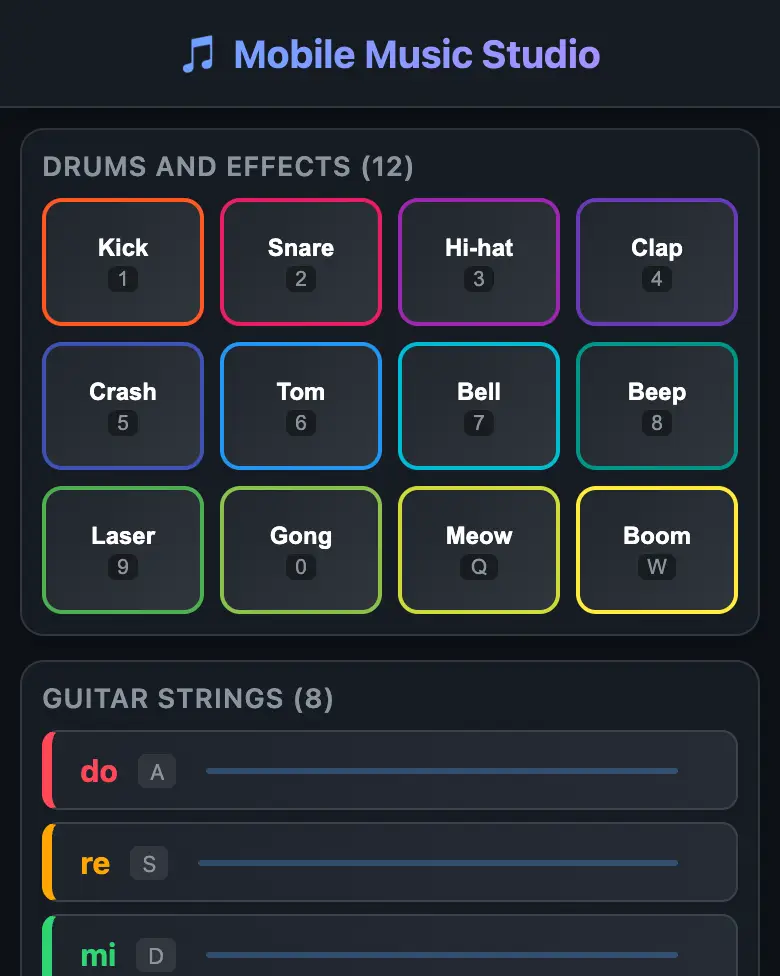
✓ Prompt tested in Gemini (signed out): worked 3 out of 3 times
- Level
- Intermediate
- You make
- A music studio in a single HTML file
- Age
- 9+
- Time
- ≈ 40 min
- Tools
- Gemini
- Account
- Not needed
What you’ll get
Eight big buttons: kick, snare, hi-hat, clap, crash, tom, bell and a funny “beep”. You press one, it flashes and plays a sound. There are no sound files: the AI writes code that draws the sound right in the browser. The example above is already level 2: a studio with strings and a melody code. On a computer, play with the keys; they are written on the buttons. Press “Play the example” and turn the sound on.
Steps
-
Open gemini.google.com. If you are under 13, do it together with a parent, on their device.
-
Copy the whole prompt and send it:
Make a drum machine for a phone in a single HTML file. Don't load anything from the internet: no Tailwind, no CDN, no fonts and no sound files; create all the sounds yourself with the Web Audio API in JavaScript. Don't save anything in browser storage. The screen has 8 big colorful buttons: kick, snare, hi-hat, clap, crash, tom, bell and a funny "beep". When pressed, a button flashes and plays its sound. On a computer the buttons can be pressed with the keys 1-8. Show the result in Canvas. -
Wait about a minute and press Preview. If a “Turn on sound” or “Start” button appears, press it: browsers only allow sound after the first tap.
-
Check the AI (the question above).
-
Press Download (sometimes it is in the Export menu): the file opens in any browser.
Level 2: music studio
Open a new chat (it is more reliable than many edits in a row) and send:
Make a music studio for a phone in a single HTML file. Don't load anything from the internet: no Tailwind, no CDN, no fonts and no sound files; create all the sounds yourself with the Web Audio API in JavaScript. Don't save anything in browser storage. At the top there are 12 colorful drum buttons: kick, snare, hi-hat, clap, crash, tom, bell, beep, laser, gong, "meow" and boom. When pressed, colorful sparks fly out of the button. Below there are 8 strings, separate buttons with the notes do, re, mi, fa, sol, la, ti, do2: they sound like a guitar and shake when pressed. Every button has a small label with its key: kick is 1, snare 2, hi-hat 3, clap 4, crash 5, tom 6, bell 7, beep 8, laser 9, gong 0, "meow" Q, boom W; the strings do, re, mi, fa, sol, la, ti, do2 are A, S, D, F, G, H, J, K. On a computer these keys play their sounds, on a phone you tap. At the bottom there is a "Melody code" box: everything I press is immediately added there as words separated by spaces, for example "kick do mi sol clap". A "Play" button plays what is written in the box, in order, and I can edit it by hand. A "Clear" button empties the box. Show the result in Canvas.
A melody is code. Play something and words appear in the box. Now edit them by hand and press “Play”. Try the start of the song “Brother John” (“Frère Jacques”):
do re mi do do re mi do mi fa sol
Copy your code and send it to a friend, and the same tune plays in their studio.
Change the prompt
Before sending, swap a few words and you get your own version. Change only the words, and keep the rules about the internet and Canvas.
- “a funny “beep”” → “a funny “meow””
- in the studio: “gong, “meow” and boom” → “gong, “woof” and a laser shot”
- in the studio: “they sound like a guitar” → “they sound like a harp”
Make the drum machine yours
Add a "Beat" button that plays a simple beat on its own with kick, snare and hi-hat until I press it again. Don't change anything else.
Then try your own ideas: replace the “beep” with a laser sound, change the colors, make 12 buttons.
If it doesn’t work
- No sound? Check that your phone is not on silent, and press the “Start” button if there is one.
- After 3-4 edits in a row, Gemini sometimes writes “[generated with web_code_canvas tool]” instead of a program. Open a new chat and send the whole level 2 prompt.
- The AI says it changed everything, but the drum machine is the same? That happens. Write:
Nothing changed. Show the updated drum machine in Canvas. - No Preview button? Write:
Show the result in Canvas.
Sending work to the gallery opens soon.