Fan page: a site about your favorite animal
One page with a drawing and flip cards. Gemini writes the code, you check the facts, because the AI makes mistakes in them.
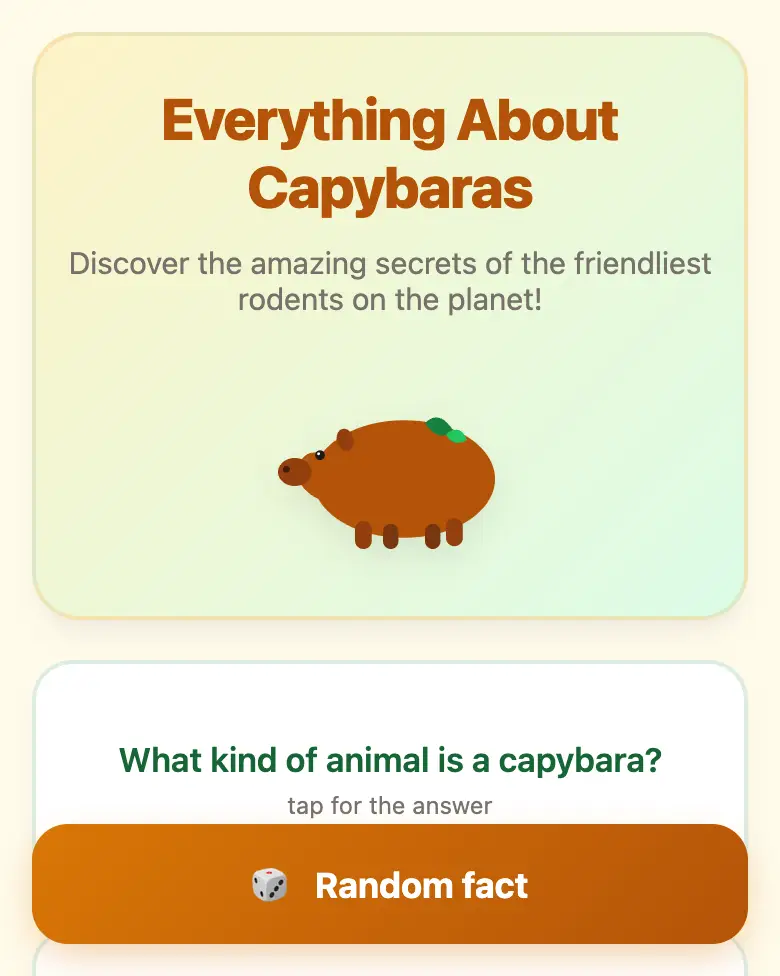
✓ Prompt tested in Gemini (signed out): worked 3 out of 3 times
- Level
- Beginner
- You make
- A page with fact cards in one HTML file
- Age
- 10+
- Time
- ≈ 30 min
- Tools
- Gemini
- Account
- Not needed
What you’ll get
A page about capybaras: a drawing, 6 “question → answer” cards, and a “Random fact” button. Press “Play the example” above. It’s exactly what Gemini made.
Steps
-
Open gemini.google.com. If you’re under 13, do it together with a parent, on their device.
-
Copy the whole prompt and send it:
Make one HTML page for phones about capybaras. Don't connect anything from the internet: no Tailwind, no CDN, no fonts, no images, only your own CSS and JavaScript inside the file. At the top, a big heading "Everything About Capybaras" and a drawing of a capybara made with CSS or SVG. Below, 6 fact cards: the front side shows a question, and when tapped the card flips over and shows the answer. At the bottom, a "Random fact" button that shows one of the facts. Warm colors: orange and green. -
Wait about a minute, press Preview, and tap the cards.
-
Check the facts (see the question above). If you find a mistake, fix it with one message, for example:
There's a mistake in the size card: capybaras grow up to about 1.3 meters. Fix only that card. -
Press Download (sometimes it’s in the Export menu). The file opens in any browser.
Change the prompt
Before sending, swap a few words to get your own version. Change only the words, and keep the rules about the internet and Canvas.
- “about capybaras” → “about sharks”, and “Everything About Capybaras” → “Everything About Sharks”
- “6 fact cards” → “9 fact cards”
- “Warm colors: orange and green” → “Sea colors: blue and turquoise”
Make the page yours
Send one change at a time and check the result:
Make the same page, but about dolphins.(or about your own favorite animal)Add a mini quiz of 3 questions with a score at the end.
If it doesn’t work
- The AI says it changed everything, but the page is the same? That happens. Write:
The page didn't change. Show the updated page in Canvas. - No “Preview” button? Write:
Show the page in Canvas. - Don’t write your own name, address, or school on the page. This is a site about an animal, not about you.
Sending work to the gallery opens soon.