Space Cat: make a phone game from one prompt
One prompt in Gemini and you have your own phone game. Then find where the AI went wrong, fix it, and make the game yours.
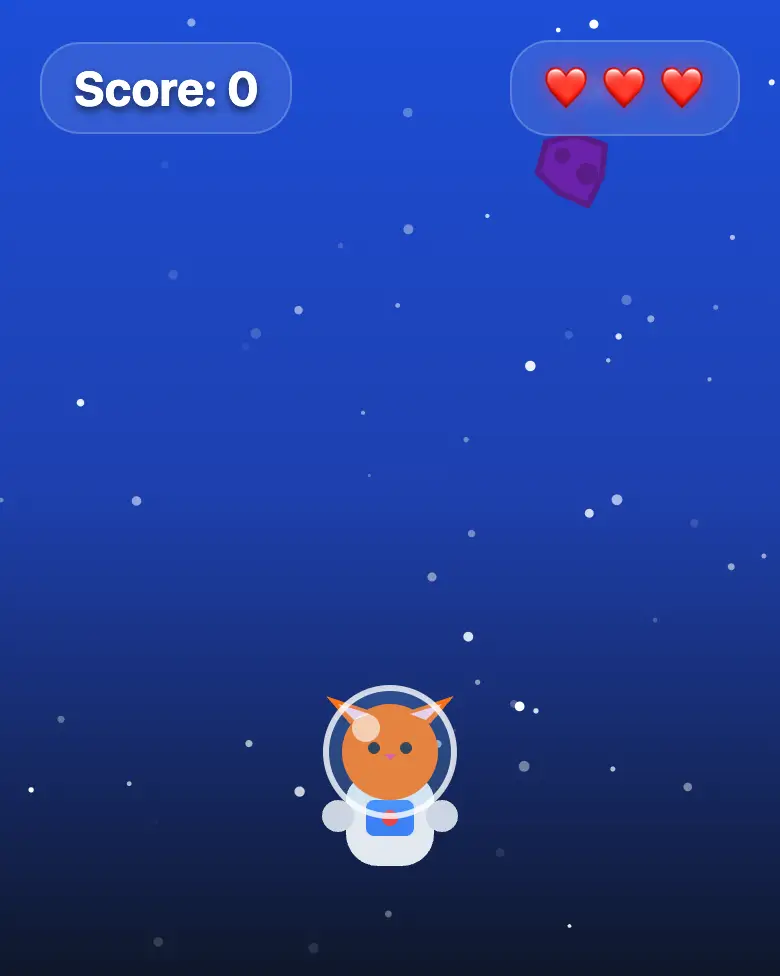
✓ Prompt tested in Gemini (signed out): worked 3 out of 3 times
- Level
- Beginner
- You make
- A phone game in one HTML file
- Age
- 10+
- Time
- ≈ 25 min
- Tools
- Gemini
- Account
- Not needed
What you’ll get
A game you can play on your phone right away: an astronaut cat catches stars and dodges rocks. Press “Play the example” above. It’s exactly what Gemini made from the prompt below.
Steps
-
Open gemini.google.com. If you’re under 13, do it together with a parent, on their device.
-
Copy the whole prompt and send it:
Make a phone game in one HTML file. Don't connect anything from the internet: no Tailwind, no CDN, no fonts, only your own CSS and JavaScript inside the file. At the bottom of the screen is a cat in a space helmet. I move it left and right with my finger (on a computer, with the arrow keys). Yellow stars and purple rocks fall from the top. A star gives 1 point, a rock takes away one of 3 lives. The more points I have, the faster everything falls. Show the points and lives at the top, and at the end a screen "Game over — tap to play again". Blue space with little stars. No images, draw everything on the canvas. -
Wait about a minute. The game appears. Press Preview and play.
-
Find the AI’s mistake (see the question above). In all our tests the background came out almost black. Fix it with one message:
The background is almost black, but I asked for a blue space. Make the background bright blue, don't change anything else. -
Press Download (sometimes it’s in the Export menu). The file opens in any browser.
Make the game yours
Send one change at a time and check the game each time:
Replace the cat with a dragon, and the stars with coins.Add a heart that sometimes falls and gives back one life.When I catch 5 stars in a row, give double points and show "COMBO!".
Change the prompt
Before sending, swap a few words to get a different game:
- “a cat in a space helmet” → “a penguin”, “stars” → “fish”, “rocks” → “icicles”, “blue space” → “blue sea”
- “A star gives 1 point” → “A star gives 5 points”
- “one of 3 lives” → “one of 5 lives”, which makes the game easier
Change only the words, and keep the rules about the internet and Canvas.
Want more? The next step is the mission “Space Cat, 3 Levels and a Win”: levels, sounds, hearts, and a trophy.
If it doesn’t work
- No “Preview” button? Write: “Show the game in Canvas.”
- The AI says it changed everything, but the game is the same? That happens. Write:
The game didn't change. Show the updated game in Canvas. - The game won’t start? Tell the AI what you see: “The screen is empty, the cat doesn’t appear.”
Sending work to the gallery opens soon.